How Long Before AI Pays Back in a Small Service Business
Target revenue-attached bottlenecks first to recover AI investment in weeks instead of months.

AI payback in a small service business depends chiefly on where the automation lands. A workflow that captures missed revenue can recover its cost in weeks, while one that saves occasional staff time may take months. Identify which recurring bottleneck costs enough to justify removing it first.
Why AI payback speed is a targeting problem, not a technology problem
McKinsey’s State of AI research found that the vast majority of organizations use AI in at least one function, but fewer than half can point to measurable bottom-line impact. That gap will be familiar to an owner who has something running but cannot identify what changed financially. Adoption is not the same as a return. A working automation proves only that a task can be automated.
The question “which AI tool should I buy?” therefore comes too early. “Where am I pointing it?” The purchase has an economic purpose if its target offers a financial return. Two businesses can buy the same tool and spend the same amount, yet one recovers its investment in weeks while the other waits eighteen months.
Small service businesses have an advantage here. With fewer demands on their time and less time needed to make decisions, they can pick one bottleneck and work through it without having to agree on a program for the whole business. But that advantage requires a deliberate choice. Automating the most visible irritation may produce a satisfying demonstration while leaving the most expensive delay untouched.
What makes a workflow return investment quickly versus slowly
The simplest test has two axes, which are volume and revenue-attachment. Volume asks how often the task occurs and how much paid work it consumes. Revenue-attachment asks whether a missed or delayed action loses money, postpones collection, or prevents billable work from starting. A frequent task close to revenue is a strong candidate because each successful intervention has a clear economic consequence.
Repetition makes that value easier to capture. A task done many times a week offers more chances to earn back the cost than a chore done now and then, even if everyone hates that chore. High-volume labor savings can also justify a build without a direct revenue link. But when the benefit consists only of recovered staff time at modest hourly rates, the investment takes longer to earn back.
Build effort changes the result as well. Fast-returning projects generally use existing no-code or low-code tools and augment the team’s workflow. Minimal custom development keeps the initial cost down, while an additive change limits the disruption involved in adoption. For an owner comparing candidates, the lesson is to consider not just the value available, but how much work stands between the business and that value.
The workflows that pay back in weeks
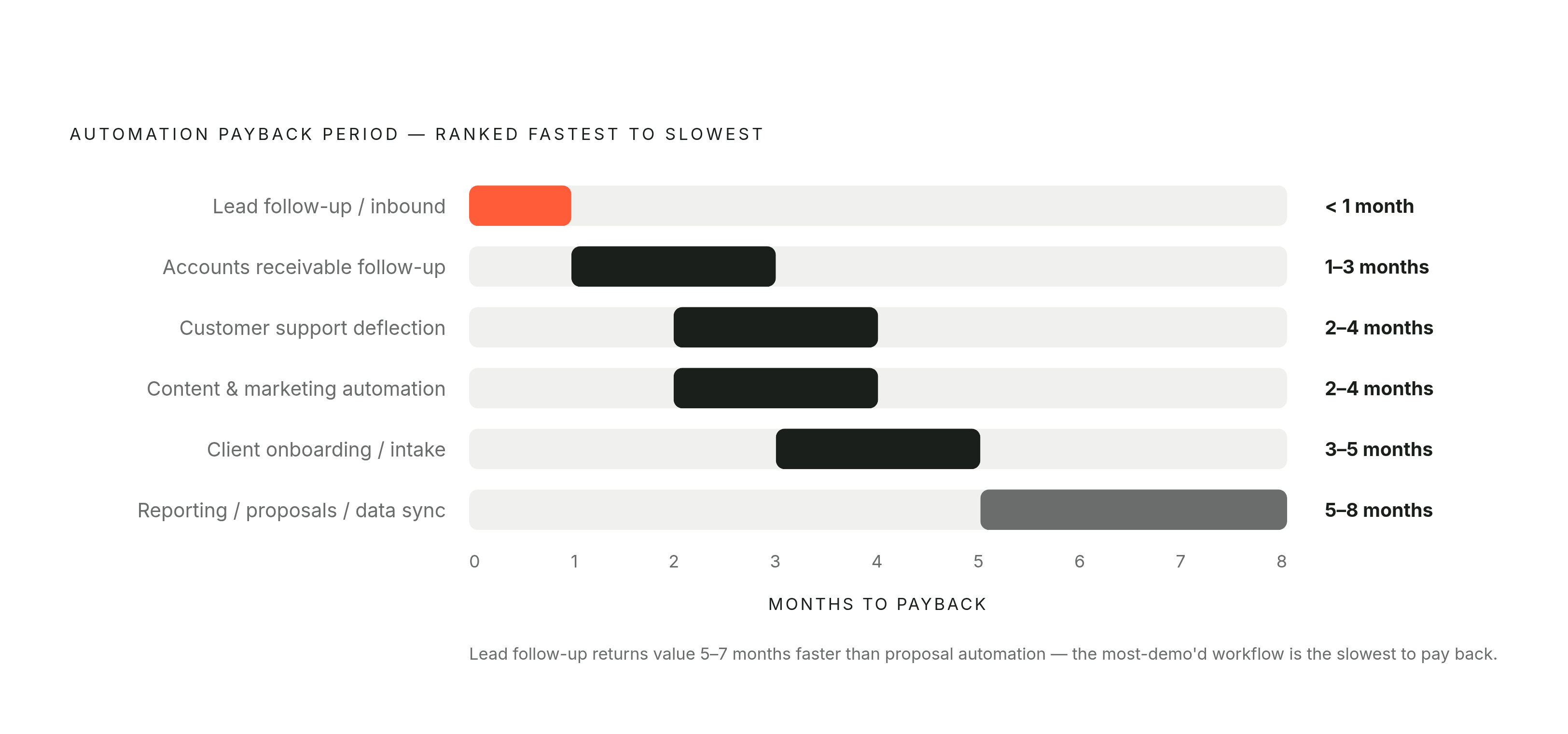
A new inbound inquiry triggers the first response and follow-up sequence, capturing interest that slow or absent follow-up would otherwise lose. Tracked cases in the dataset of 50-plus SMB builds generally put payback under a month, making this its fastest-returning workflow. The automation is not creating demand from scratch.
Accounts receivable follow-up works on a similar principle. Open invoices prompt follow-up, so the system pursues money the business is owed rather than producing an estimate of improved productivity. Payback in the same dataset falls at one to three months, with more open invoices strengthening the return. That is a short recovery period, though not a promise that every collections project pays for itself within weeks.
When a client enters onboarding, the automation handles intake and document collection so missing paperwork does not hold up the start of billable work. Typical administrative automation takes three to five months to pay back, but professional services onboarding can recover its cost sooner when it removes that specific bottleneck.
Customer support deflection addresses high-volume labor costs. Incoming questions that the knowledge base can answer are handled without requiring the team to answer each one. The dataset places median payback at two to four months, the fastest among its cost-saving projects. Knowledge-base completeness is the strongest predictor of speed here, which makes this a useful counterexample to the idea that every fast return must come directly from revenue.
The workflows that take months, and why owners start there anyway
Reporting, data synchronization, and proposal generation can all earn back enough to be worth their cost. The dataset puts their payback at five to eight months because the benefit mainly arrives through recovered staff time at limited weekly volume. Saving three to five hours on each proposal gives staff that time back. If proposals are infrequent, however, the accumulated savings may not recover the build cost until month six or seven.
For content and marketing automation, payback also depends on how much work there is. Payback can fall at two to four months for teams that produce 20+ pieces monthly, though the time it takes also depends on how hard the integration is. A business that produces little content will not get the same return as a busy publishing team just by using the same software.
These projects are reasonable places for owners to look. A report or proposal draft makes the AI’s contribution visible, while successful lead follow-up may appear only as a number in a CRM. Writing a draft also feels safer than sending an invoice reminder to the wrong client. And a polished proposal makes a better demonstration than a backend follow-up sequence. The demo has better lighting than the bookkeeping.
Choosing these workflows first when a faster-returning candidate is available is a mistake. That choice delays both the project’s recovery and the cash and confidence available for the next build. A preference for something visible can therefore slow the whole sequence of investment.
How to actually calculate what a workflow is worth before building it
The practical response is to compare candidates in a spreadsheet before choosing one. The calculation has four components, beginning with monthly hours saved multiplied by the loaded labor rate of the person actually doing the task. Otherwise, a modest administrative saving acquires an executive salary on its way into the business case.
The next component is monetized revenue increase or risk reduction, included only when clearly attributable to the automation. Downstream benefits that cannot be measured do not belong in the total. The third component is the initial build cost, spread over a realistic recovery window. The fourth is monthly operating cost, including model API usage, infrastructure, monitoring, and internal management time priced at the same loaded labor rate.
The arithmetic can stay in plain view. The hours saved each month × the loaded labor rate gives the labor benefit. Adding attributable revenue or risk reduction, then subtracting monthly operating and management costs, gives the monthly net benefit before recovering the build. The initial build cost ÷ that monthly net benefit gives an estimate of how long payback will take, as long as the monthly benefit is positive.
Before the build, use cautious estimates and check whether it will pay back in under six months. A workflow that passes qualifies for consideration alongside other candidates. Doing the same sums for several workflows makes it clear how they differ.
What the first thirty days actually look like, and where the efficiency dip hits
A single, well-scoped workflow can be live within a month. No-code starter implementations such as lead management, appointment reminders, or basic document processing avoid a long custom-development cycle. But deployment and payback have different clocks. Going live marks the start of operating value, while payback marks the date when accumulated benefits have recovered the investment.
A staged rollout keeps those clocks from being confused. The first phase establishes the foundation and one workflow, the next adds several workflows, and a later phase completes a more advanced implementation. Each stage builds on what the previous one proved. This approach gives the team a bounded change to absorb rather than an entire new operating system to learn at once.
Even a bounded change can cause an efficiency dip. People who do not yet trust the tool may work around it or double-check every output, temporarily making the process slower. That hidden cost of learning to work with the tool can be larger than the software bill suggests. The dip is not, by itself, evidence that the build has failed.
To reduce that friction, the team that owns the work should help scope the first build. SANSA’s approach starts with a two-week diagnosis and emphasizes working with the existing team. That structure addresses adoption during design instead of treating it as a problem to fix after delivery. It gives the business a better chance of getting the workflow to run steadily without giving up too soon on one that could help the team.
Why data quality determines whether any timeline estimate holds
Every payback estimate assumes the automation has data it can work with. Data quality is the strongest predictor of whether the expected return holds, because autonomous systems can repeat the consequences of bad records at speed and scale. Duplicate customer entries, stale contact information, and incorrect pricing are not minor housekeeping defects once a system acts on them. They become inputs to repeated operational errors.
Consider accounts receivable follow-up on stale CRM data. Instead of accelerating collection, the system sends reminders to wrong addresses and creates customer service problems. The build may work exactly as designed. Yet the business pays to resolve mistakes while the intended collection benefit fails to arrive, extending payback or potentially reversing the return.
The pre-deployment check should therefore start with duplicate and stale CRM records before any automation that deals with customers goes live. It should also define escalation rules for financial thresholds, legal exposure, and sensitive customer information, so the system has clear boundaries for routing work to a human. Logging belongs in the build from day one. A complete audit trail helps protect the business legally and has the details needed to look into decisions that harm a customer relationship and make better ones.
This belongs in workflow selection. A workflow that looks ideal but has poor data may take longer to pay back than a slightly less promising one with clean records. The cost of making the data usable is part of the route to a return.
How the first win compounds into a faster second build
A well-chosen first build leaves more than recovered investment. Platform and integration work is already paid for, lowering implementation costs for later workflows on the same stack. The team has also learned how to adopt an automation, so established trust can shorten the next efficiency dip. Meanwhile, response times, conversion rates, and volume patterns from the first build make the second targeting decision more precise.
Those advantages require continuity to turn into savings. SANSA’s three-stage model diagnoses the bottleneck, builds the first system, and stays embedded as the work compounds. With that support, the owner can use what the first build shows to help choose the next one without having to make that choice alone.
As bottlenecks disappear, the business’s capacity constraint shifts. A service firm that automates lead follow-up can take on more clients than its previous response capacity allowed, which is a different return from reducing labor hours. The home services example in the brief illustrates that distinction through administrative automation followed by reinvestment in a revenue-generating field technician.
Access to systems that removed an operating constraint limited the business. After lead follow-up and onboarding have both been addressed, a service business can respond to inbound interest without waiting for manual follow-up and collect the documents needed to start billable work without the same administrative delay. Its operating data then shows where work accumulates next, giving the next investment a target.