Calculating AI Payback Period for a Sub-100-Person Service Business
A three-part formula separates quick payback from slow ones.

To work out AI payback for a sub-100-person service business, three things must be measured well: loaded labor rate, volume at the targeted bottleneck, and total implementation cost. Those inputs can separate a 3-month payback from a 12-month one. Measure how much usable time AI recovers, at what cost, and how soon that benefit repays the build.
Why the payback period formula most SMBs use is wrong before they start
Adoption is no longer the question. Measurability is. A small service business may have AI tools in use without being able to point to a bottom-line improvement. That gap often begins with targeting and calculation. A tool can do its job well but do too little work of value to pay for itself.
The generic ROI formula, net benefit divided by total cost, measures return, and payback measures the time required to recover an investment, with both calculations depending on sound inputs. Using wages instead of loaded labor cost understates the benefit, while counting subscriptions alone understates the expense. Counting every minute saved as a saving from day one also skews the result. The spreadsheet adds up beautifully because nobody has told it about exception handling.
What "loaded labor rate" actually means for a sub-100-person service firm
Loaded labor rate is the employer’s cost of an employee’s time. It includes payroll taxes, benefits, workers’ comp, and any overhead allocation. Those costs belong in the calculation because the work being automated consumes paid capacity supported by all of them. Salary alone is an incomplete price tag.
For payroll modeling, the calculation starts with annual salary, or hourly wage multiplied by standard full-time annual hours. With the employer-side costs added, the total is the loaded annual cost. Dividing that total by standard full-time annual hours produces the loaded hourly rate. The calculation thus runs from wage to loaded annual cost to loaded hourly rate, with each step grounded in the firm’s own records.
For a salaried administrator, the loaded annual figure will be materially higher than salary alone. Use the rate for the person actually doing the work, rather than the owner’s effective rate or a firm-wide average. Getting this rate right changes every later estimate of the value of time freed up. It does not, however, make every recovered hour an immediate reduction in payroll. The calculation values time, while the capture assumption determines how much of that value is realistically available.
Identifying the right bottleneck to measure volume against
Picking the wrong process is a more common failure than picking the wrong tool. High-volume, repetitive work gives automation enough repetitions to recover its build cost, particularly when it touches customers or revenue. When less work comes in, there are fewer chances to earn back the build cost. An elegant solution can still have very little to do.
Lead response and follow-up have a direct route to value because recovered leads can translate into revenue. Administrative automation depends more heavily on enough scheduling requests, documents, or data-entry tasks accumulating each week. Back-office reporting and data sync can be worthwhile, with benefits from recovered staff hours. They therefore need enough work or a high loaded rate to pay for the build quickly.
To compare candidate processes, count discrete instances per week and time the current average handling time for each. “Email marketing” is too broad to measure. “Writing and scheduling one email campaign” is a usable unit. Multiplying instances by handling time, expressed in hours, gives the weekly workload the formula needs. Ticket triage illustrates the threshold neatly, because a few minutes per ticket create a substantial opportunity only when enough tickets arrive.
Building an honest total implementation cost — including what vendors omit
The subscription is usually a minority of the true implementation cost. A credible estimate includes the work needed to put the tool into service and the work needed to keep it useful. The distinction is easy to miss. A tool with a low sticker price can cost much more to integrate.
Before signing a contract, the practical task is to audit the full cost stack. Software costs include subscriptions, API usage, and platform licenses, while setup includes configuration, integration, and testing. Connecting an existing CRM, ERP, or customer database may require custom API work. Training also consumes paid capacity, so several hours per staff member must be priced at the relevant loaded rate.
The audit should also include whoever tunes edge cases, updates prompts, and reviews outputs each month. The upfront investment covers setup and training, while the ongoing cost of software and staff time to run it comes out of the monthly benefit. Keeping those categories separate avoids both omissions and double counting. The budget also needs a hidden-cost buffer for implementation and integration overruns, rather than blind acceptance of a vendor’s all-in estimate. An accurate cost figure is what makes the payback formula trustworthy.
The payback period formula assembled, with a worked example
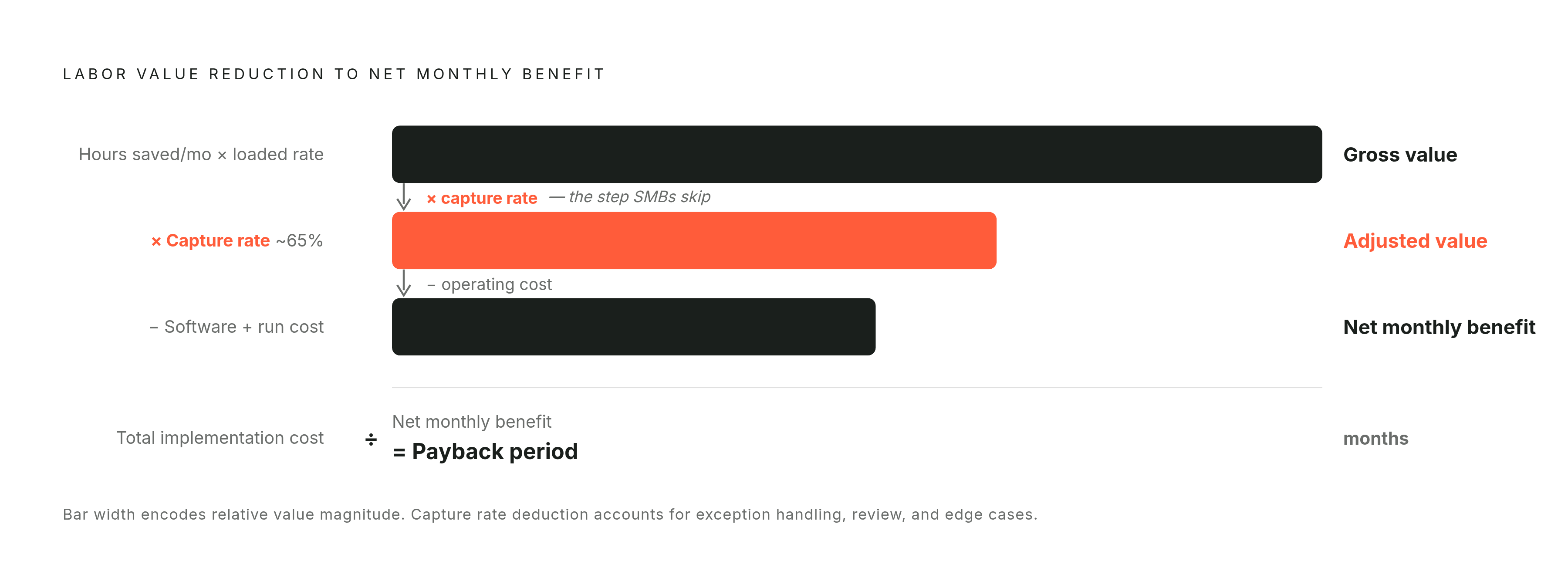
Payback Period (months) = Total Implementation Cost ÷ Net Monthly Benefit.
Net Monthly Benefit = (Hours saved per month × Loaded hourly rate × Realistic capture rate) − Monthly operating cost.
The capture rate is the essential restraint. Hours saved in this formula are the hours that could be freed up before taking time out for exception handling, review, and edge cases. Applying the capture rate to the gross labor value accounts for time that does not flow through to usable savings. Monthly operating costs are then subtracted, including the internal time required to run the system.
In the accounting-firm example, two administrative staff spend a large part of their week collecting documents, scheduling appointments, and answering routine questions. That is an identifiable, repetitive onboarding bottleneck. However, the case provides no measured hours, loaded rates, capture percentage, or implementation bill, so a numerical payback result would be invented. The honest walkthrough must stop short of a dollar answer.
To complete that calculation, the firm would total the monthly hours potentially recovered across the two staff members and value those hours at their loaded rates. It would then apply a realistic capture rate, subtract monthly operating costs, and divide the implementation investment by the resulting net monthly benefit. That sequence is replicable with the firm’s own figures. It also explains why choosing a busier bottleneck can accelerate payback more than negotiating a cheaper subscription, because volume expands the benefit side of the calculation.
How the efficiency dip in weeks 1–4 affects the payback timeline and how to plan for it
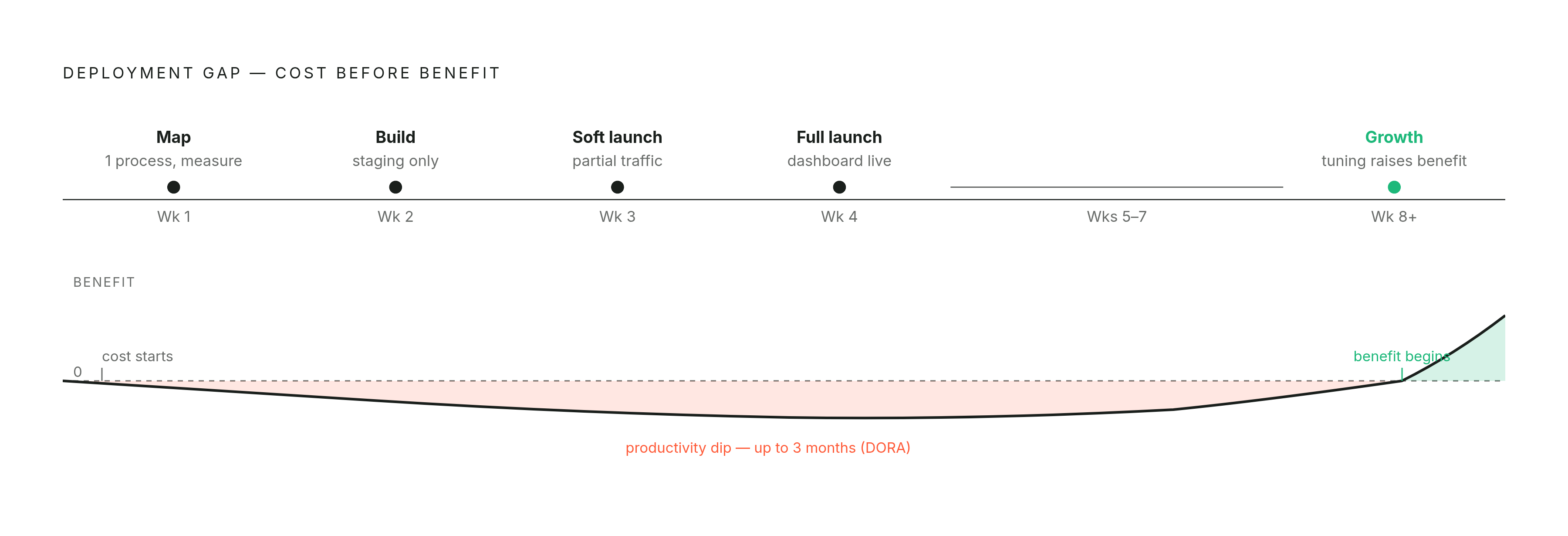
The simple formula assumes a steady-state monthly benefit. Deployment does not begin at steady state. Staff must learn the system, exceptions must be resolved, and review can temporarily consume more time than the tool saves. A cash-flow model therefore needs room for a negative or flat first month rather than booking the full projected benefit immediately.
DORA’s ROI guidance says a productivity dip can last roughly three months or more, so the first four weeks give firms a window to plan around, with no promise that all firms will recover by then. From weeks 8 onward, tuning agentic processes and changing how staff work can raise the benefit rate. How fast the benefit grows still has to be measured, even if choosing a date would be easier.
To plan that ramp, a structured 30-day deployment starts in week 1 by mapping exactly one process and measuring hours, volume, and error rate. Week 2 is for building in a staging environment without touching live operations. Week 3 introduces a soft launch to a fraction of real traffic, with close monitoring and edge-case resolution. Week 4 is when the system launches in full, with a measurement dashboard already in place. This structure makes the 30-day review a test of the formula’s inputs under real conditions.
What to do when the formula gives you a payback period longer than 6 months
A first-project payback longer than 6 months usually calls for diagnosis. First, check whether the process has enough volume to overcome the build cost. The other choices are a process with more work to do or one system that handles several low-volume tasks.
The next check is the loaded rate. If the calculation used wages alone, replacing that figure with the true employer cost may change the result substantially. The cost side then needs inspection for integration debt. Where custom API work for a legacy system dominates the investment, a lighter integration path or a different starting process may preserve the core benefit with less upfront work.
Work that follows rules and repeats often allows for a higher capture rate than work that needs a lot of judgment and has frequent exceptions. The weakest choices for a first project tend to have little work each week, a high exception rate, and no direct link to revenue. Back-office reporting or data sync may still deserve investment, but a slow result is a reason to reconsider sequencing before committing.
The embedded AI model versus hiring: how the payback calculation changes depending on how you resource the build
The resourcing decision changes payback before any workflow improves. An in-house AI engineer brings recruiting costs, benefits, and ramp time in addition to base salary. Recruitment and onboarding also delay the first operational benefit. For most sub-100-person firms, that makes a permanent hire difficult to justify as the first AI investment.
A contractor is a real alternative, particularly for work that involves embedding with a team and connecting an agent to existing systems. The complication is the commercial structure. When a contractor bills by the hour and the scope is open-ended, the total implementation cost is unknown at the start. The firm can calculate a range, but its payback estimate remains exposed to how much work the build ultimately requires.
A fixed-scope embedded engagement makes that input more predictable through one prioritized use case, a fixed price, and defined handover deliverables. Integrated AI platform consulting engagements in 2026 can cost $5,000–$20,000, although that range is not a quote for any particular provider. SANSA fits this model as a fixed-scope embedded option built for the SMB context.
The distinction extends beyond the first build. When the same partner remains embedded as the system runs, integrations, data pipelines, and monitoring infrastructure can support subsequent systems. That spreads platform work across more than one investment. It explains how later-year returns can improve even when year one only breaks even, without requiring the first project’s economics to be dressed up.
Running the formula on your own business: the pre-calculation checklist
Before committing to a tool or vendor, the practical starting point is a measured bottleneck and usable data. Count the work, time its handling, and audit the relevant CRM records, ticket logs, or documents for completeness and accuracy. Bad data is not repaired by faster processing. An autonomous system can amplify defects as readily as it amplifies useful work.
With that groundwork in place, four checks make the calculation repeatable. First, calculate loaded annual cost divided by standard full-time annual hours for the specific role doing the work. Second, assemble the full cost stack, including software, implementation, integration, training, recurring operations, and internal operating time, with a hidden-cost buffer. Third, apply a capture rate that leaves room for review and exceptions. Fourth, take the total implementation cost and divide it by the net monthly benefit.
The resulting period determines the next step. Under 6 months is a reason to go ahead, while 6–12 months calls for the diagnostic checks before committing. A result exceeding 12 months on a first project is a reason to revisit use-case selection. These thresholds help the firm decide, while the deployment dashboard checks whether the assumptions hold up when the system is in use.
The first payback is not the whole prize. Once a system reaches steady state and repays its investment, the integrations, data pipelines, and measurement infrastructure beneath it can reduce the implementation cost of the next system. A third or fourth build can therefore have a shorter payback even without better AI tooling.