Cost of Hiring vs Cost of Automating for Small Business Operations
Fully-loaded hiring costs far more than automation when you count everything.

Small businesses facing a capacity crunch default to hiring because a salary is a number they can see, while automation's price tag looks like the only number on that side of the ledger too. Both comparisons are incomplete, and the gap between what hiring looks like it costs and what it actually costs is wider than the equivalent gap on the automation side. That asymmetry quietly tilts the decision toward hiring before anyone runs the real math. This piece runs both sides honestly: fully-loaded hiring costs against the true, all-in cost of automation, so the decision gets made on numbers instead of instinct. The short answer, for a business weighing a new operations hire against a software fix: a fully-loaded admin or ops hire runs far more per year than an equivalent AI automation deployment typically costs all-in, and that gap widens, not narrows, as volume grows.
Why the hiring-vs-automation question is harder than it looks
The scene is familiar to anyone who has run a five-person shop past its comfortable size: the phones don't stop, the inbox backs up, someone's doing data entry at 9 p.m., and the obvious fix is to post a job. The job listing has a salary range on it, so that's the number the owner compares against. On the automation side, the comparison point is whatever a vendor quotes for a monthly subscription. Neither number is the real cost of either option, and that's a problem, because the decision is only as good as the inputs.
The salary line omits taxes, benefits, recruiting, onboarding, equipment, management time, and the months of ramp-up before a new hire produces at full capacity. The automation quote often omits setup, integration, data cleanup, and maintenance. Both sides have hidden costs, but the hiring side carries more of them, and they're larger in dollar terms. That means the instinct to hire is biased by a system that makes hiring look simpler than it is. The rest of this piece runs both full accountings side by side.
The full cost of a new hire
Base salary for a typical small-business admin or operations hire runs in a wide range depending on market and location, and that's the number on the job posting. Payroll taxes and benefits add a substantial share on top of base salary once mandatory government payroll taxes, unemployment insurance, health coverage, and retirement contributions are factored in. Recruiting and onboarding cost money before the person ever answers a phone: job board postings, recruiter fees if used, interview time from existing staff, and training materials. Equipment, software licenses, and a desk add more, and office overhead for a single employee can run well beyond what a software line item would suggest.
Management time rarely makes it into any budget: supervision, one-on-ones, performance reviews, conflict resolution, and the general cost of being someone's boss. Managing a hire consumes hours that would otherwise go toward running the business. Adding it all up turns a modest base salary into a fully-loaded annual commitment considerably higher for a mid-market small business, a figure that holds regardless of how much or how little work actually comes through that role in a given month.
Productive hours tell the rest of the story. A calendar year offers a large number of working hours for a full-time employee, but PTO, sick days, and holidays cut into that total meaningfully, and the first three to six months on the job typically bring partial output at full salary while the person ramps up. The business is paying for a full year of capacity and receiving something less than that, especially early on. That's what one person's capacity costs, fully counted. The next question is whether that same capacity can be sourced a different way, and at what price.
The hidden costs of automation
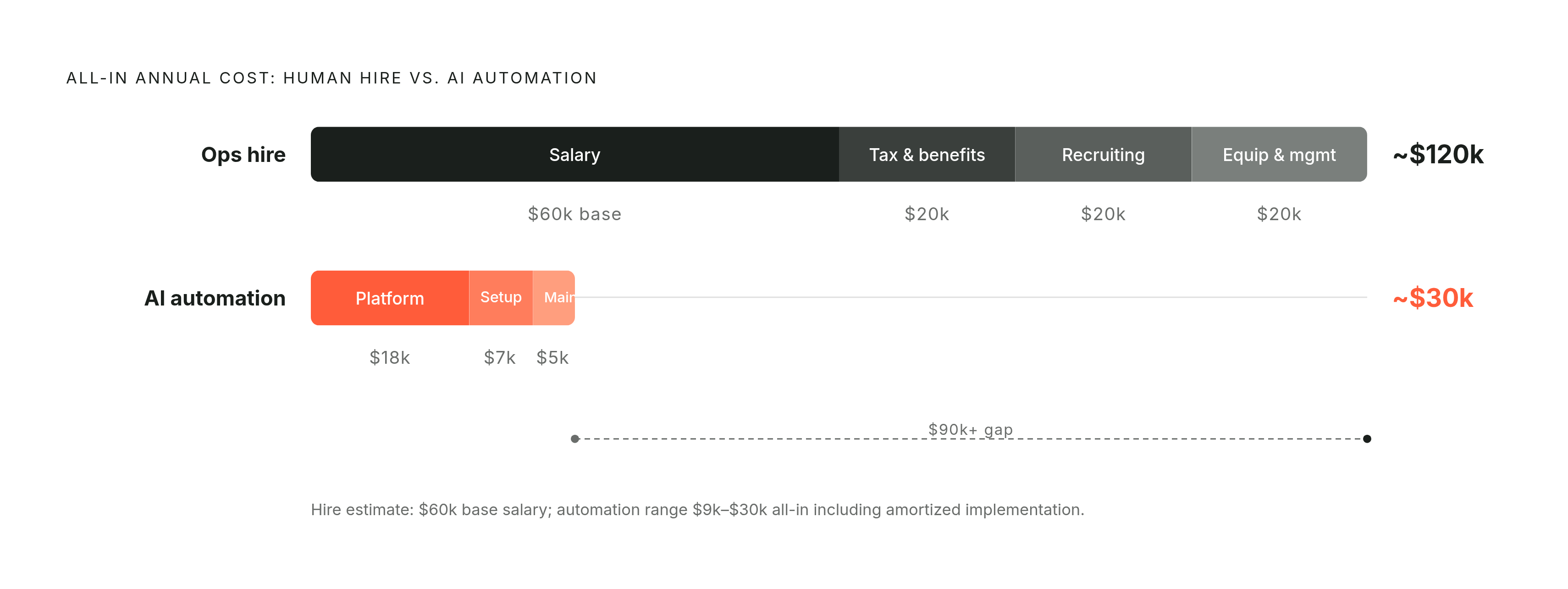
Monthly platform costs for small-business automation vary by the number of workflows involved and the scale of the operation, and setup or implementation costs scale with complexity, often landing in the same range as the cost of recruiting and onboarding a single employee. Where a fully-loaded operations coordinator runs considerably more per year, an equivalent AI automation deployment typically costs $9,000 to $30,000 per year all-in once implementation is amortized across the year. A custom AI system scales in value without scaling in cost the way a headcount line does. Partners that specialize in deploying AI inside small businesses, Sansatech among them, often get a first implementation running in weeks rather than months, which compresses setup costs and shortens the time before the system is doing productive work, lowering the amortized annual spend further.
Automation costs stay fixed and predictable. Unlike payroll, a subscription or deployment cost doesn't rise with raises, doesn't inflate with benefits costs, doesn't trigger overtime, and doesn't reset when someone quits. The system runs around the clock without PTO, without sick days, and without a ramp period: it produces at full output from day one, and the cost of its hundredth task looks the same as the cost of its first.
None of that means the vendor quote is the whole bill. Data preparation, integration work with existing software, change management inside the team, and ongoing maintenance frequently push the real total above the initial estimate. Maintenance for a custom AI system varies by how complex the build is and can represent a real monthly expense on its own. The honest reckoning on these hidden costs does push total cost of ownership higher than a vendor quote suggests, and that's exactly why the right comparison is total cost of ownership over 12 to 24 months, not the sticker price of the monthly subscription. Even counting every one of those additions, the all-in automation spend remains a fraction of a fully-loaded hire's cost, and automation carries none of the turnover risk that comes with a human employee walking out the door six months after onboarding finished.
How the scaling math changes everything once volume grows
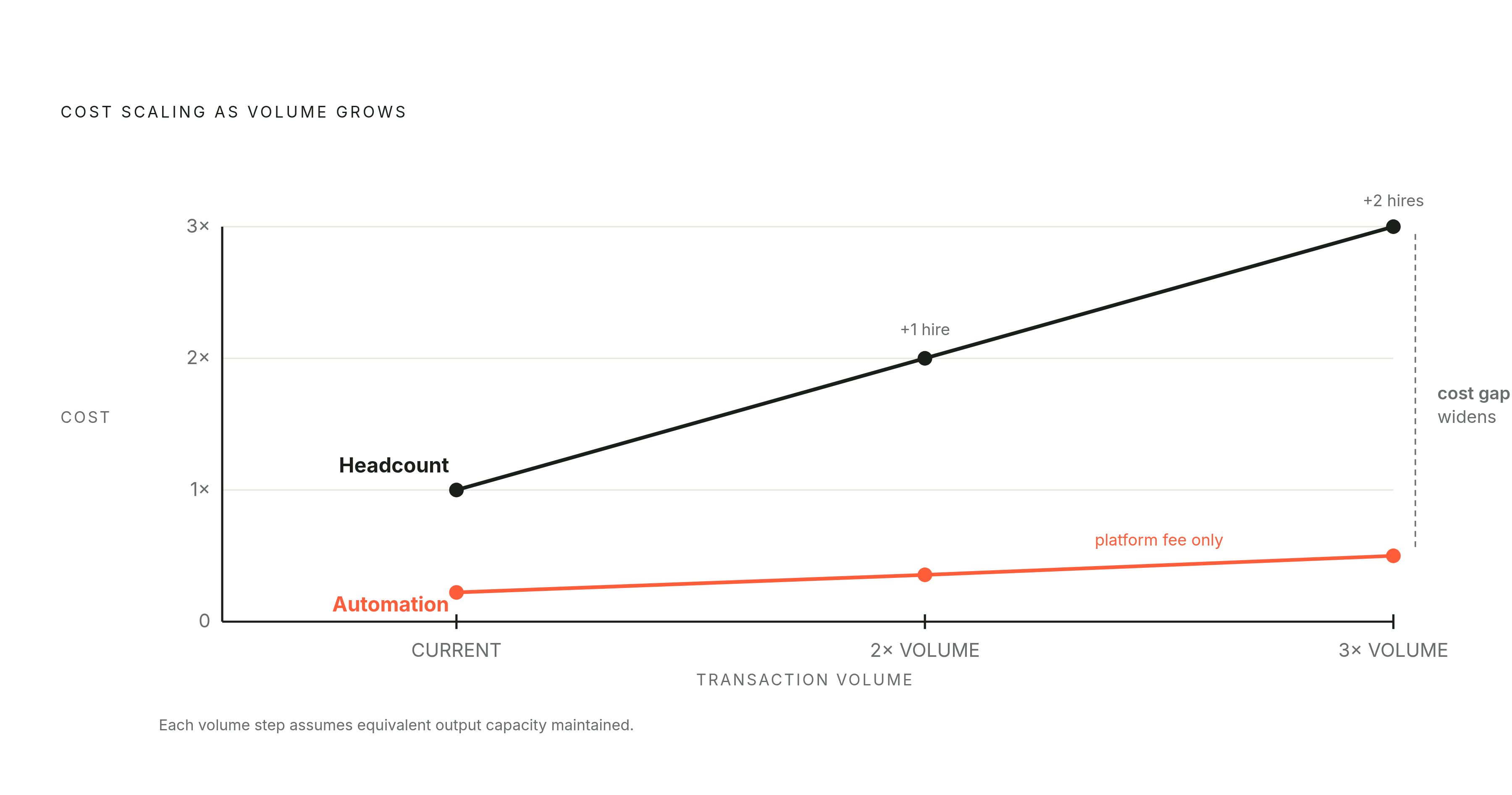
A cost comparison taken at one moment in time misses the part of this decision that matters most over a three-year horizon. When transaction volume or request frequency doubles, a human team's cost doubles with it: another hire, another desk, another benefits liability, another slice of management time. Every new hire brings fixed costs that stack on top of the last one, salary, taxes, benefits, HR complexity, and turnover risk, and that cost curve rises steeply with no mechanism to bend back down when volume dips.
Automation's cost structure doesn't follow that curve. The system handling a modest volume of tasks a month costs close to the same to run as one handling many times that volume, because the marginal cost of an additional interaction, once the system is built, is close to zero. An extra thousand support tickets or invoices a month might add a bit of platform usage fee, not another salary. That means the financial advantage of automation compounds as the business scales, turning what looks like a one-time efficiency gain into a permanent structural edge.
The choice three years out, at double or triple the current volume, is which cost structure the business wants to be carrying. A business that automates its repetitive operational work at five employees doesn't need to hire into that same work when it reaches ten employees: the capacity already exists, and the savings from avoiding that hire compound forward every year after. The automation has to target the right workflows for any of this to work.
Which workflows produce the clearest return
The clearest returns come from work that's repetitive, rule-based, high-volume, and already eating a disproportionate share of staff time. Lead and prospect management is one of the strongest candidates: follow-up sequences triggered by CRM activity, response-speed improvements, and lead routing all fall into patterns a system can handle without judgment calls. Appointment and scheduling workflows, calendar checks, booking confirmations, reminders across a team, are similarly mechanical. Financial document processing, invoice generation, payment reminders, and data entry between systems follow the same logic, as does client onboarding, document collection, signature requests, and welcome sequences. Customer FAQ and triage, routing incoming requests to the right person and handling the same high-frequency questions, rounds out the list.
Response speed deserves particular attention because it converts directly into revenue: businesses that respond to inbound leads within minutes close at dramatically higher rates than those that take hours, which makes this a revenue gain sitting on top of a cost saving. A home services company automated phone answering, lead follow-up, scheduling, and review requests for $2,800 a month total, eliminated two administrative positions as a result, and reinvested the savings into a field technician who generated substantial additional revenue, producing a strong net profit gain for the year. An HVAC operator put in a modest monthly fee plus a small setup cost and saw the call answer rate rise sharply, booking conversion improve significantly, and real monthly revenue recovered from calls that used to go unanswered.
Not every workflow belongs on the list. Low-volume tasks, the ones that happen a few times a week, rarely produce a return worth the setup effort, no matter how cleanly the automation runs. Processes that are still unstable or undocumented make poor starting points too: automating something that changes every few weeks produces a system that breaks constantly, so the process needs to be documented and stabilized first. Emotionally sensitive or high-stakes customer interactions call for human judgment and are better supported by automation (gathering context, routing the request) than replaced by it. Hiring a person to patch a broken process is a mistake that comes up often enough to name directly: the new hire inherits the same inefficiency the process already had, costs go up, and output doesn't rise to match. Knowing which workflows to automate solves half the problem. Getting a working system live fast enough to matter is the other requirement.
Deployment speed and payback
The timeline that used to make automation impractical for a small business has shrunk, and the payback period has shrunk with it. No-code platforms with visual, drag-and-drop interfaces mean a first automation can go live without an in-house engineering team: the barrier is a clearly mapped process, not technical skill. Starter implementations covering three to five workflows, lead management, appointment reminders, basic document processing, typically run $500 to $2,000 in implementation fees plus a modest ongoing monthly platform cost.
Payback periods vary by workflow, and high-volume, low-cost targets like invoice reminders or appointment scheduling tend to pay back fastest, sometimes within weeks, while broader implementations take longer to clear their setup cost. Compare that to a new hire's ramp period, often several months at full salary before the person reaches full productivity, and the contrast is stark: an automation is producing at full output from the day it goes live.
A practical sequence for the first 30 days looks like this. In days one through fourteen, audit the highest-volume repetitive workflows, set baseline metrics, response time, missed-call rate, cost per interaction, and narrow the list to the top two or three targets. In days fifteen through thirty, implement the first automation, measure it against the baseline, and iterate before adding the next workflow. A live system producing real output fast teaches the business more in a month than an extended planning cycle would teach it in a quarter. The real payoff starts to show up once that first system is running.
What recovered capacity unlocks
Time recovered through automation only converts to cash savings if headcount gets cut, and most small businesses neither want to do that nor should. The more valuable outcome is redeployment: staff freed from repetitive work move into revenue-generating activity, client relationships, or the kind of judgment work a system can't do, upgrading what the existing team is capable of while keeping the team intact. The money saved by eliminating two administrative roles in the home services example didn't just sit on a balance sheet; it funded a field technician who went on to generate new revenue. The automation didn't just cut a cost; it paid for a hire that grew the business.
The sequencing matters as much as the mechanism. Automating repetitive work first, then hiring for judgment-heavy work second, produces better outcomes than doing it the other way around, because the second hire lands on a team that already has its mechanical workload handled. For a five-person operation, recovering even a fraction of one full-time employee's hours each week means the team can turn around a quote faster, take on a client it would otherwise have had to decline, or make a call that used to require a specialist the business couldn't afford to keep on staff. That's the part a cost comparison alone misses: automated capacity at the real bottleneck doesn't just make the business leaner, it changes what the business can take on. Getting to that point on a specific role or workflow still requires a method, not just a conviction.
A practical framework for making the hire-or-automate decision for a specific role or workflow
Six questions cover most of what matters.
Task nature comes first: map the team's weekly work as repetitive or judgment-based. If a meaningful share of time goes to repetitive tasks, automation has immediate upside. If the work depends on trust, creativity, negotiation, or managing a relationship, that's a role to hire for, not automate around.
Volume and growth trajectory come second: a task happening a handful of times a week rarely justifies a build, but a task scaling with the business, growing from hundreds to thousands of instances a month, is exactly where the marginal-cost advantage of automation compounds.
Process stability is the third filter: a workflow that changes every few weeks needs to be documented and stabilized before it's automated, or the system will need constant rework.
Cost structure over a multi-year horizon is fourth: a hire's fully-loaded cost rises every year with raises and benefits inflation, while an automation's annual cost, far lower to begin with, stays fixed regardless of volume, which matters more the longer the time horizon being planned for.
Speed to value is fifth: a scoped automation can be live in weeks for $500 to $2,000 in implementation costs, while a new hire needs months of ramp-up before reaching full output.
Downstream capacity is sixth and last: the question isn't only what a given role or workflow costs today, but what capacity gets freed up once it's handled, and what that freed capacity lets the business take on that it couldn't before.
Running a specific role or workflow against all six turns the hire-or-automate decision from a guess about which number looks smaller on a page into a structural read on where the business is headed.