Capacity Planning for Small Businesses Using AI Throughput Data
AI-generated logs reveal the actual capacity your team can handle, replacing guesswork with data.

Small businesses adopt AI to cut down on manual work: fewer steps, faster turnaround, less rework. What almost nobody tells them going in is that the same system quietly starts keeping a diary of the business itself: volumes, speeds, wait times, error rates, all logged automatically. That diary is throughput data, and it's the first real-time picture most small businesses have ever had of how much their team can actually process. For decades, capacity decisions at this scale got made on vibes: "we feel busy," "we can probably squeeze in another client." This is a guide to reading the diary instead of guessing.
What throughput data is and where it comes from in an embedded AI workflow
Throughput data is the measurable output a workflow produces per unit of time. Invoices processed per hour. Quotes generated per day. Support tickets closed per rep per week. Nothing exotic about the concept; accountants and factory managers have tracked versions of this forever. What's new is where the numbers come from and how cheap they are to collect once AI sits inside the actual work.
When an AI system is embedded in a real work step, rather than bolted on next to it, it logs what happens at that step by default. Every handoff, every delay, every spike in volume, every kicked-back error becomes a timestamped record. An insurance broker's document intake system shows how many submissions come in each day and exactly where they stall before reaching underwriting. A freight company's load-matching workflow tracks how long each booking takes from the first request to a confirmed load. An accounting firm's data entry automation counts how many line items it clears an hour and flags what it can't handle without a human.
This is the operational signature of the workflow itself, the thing a human team was never equipped to record consistently because nobody has time to timestamp every invoice by hand. What throughput data captures that a team's memory never can is completeness: every transaction, the full record rather than a manager's Friday-afternoon impression of how the week went. Context is a separate matter that stays outside the data. Seasonality, a client who's just genuinely more complicated than the rest, a one-off system outage all require a human to interpret the data alongside whatever a dashboard displays. Research shows 62% of small businesses already use AI for data analysis tasks, which means a lot of them are sitting on this exact signal without knowing to call it that.
The baseline problem: why most SMBs can't use their throughput data yet
Here's the catch nobody warns you about: throughput data only means something if you know what normal looked like before. A processing rate of 40 invoices a day is either a triumph or a disaster depending entirely on what the number was last quarter. Without a baseline, you can't tell improvement from noise, and this is the single most common reason capacity planning with AI produces a shrug instead of an answer.
A usable baseline needs four things: volume (how many units moved through per day or week), cycle time (how long each unit took start to finish), error or rework rate (what share needed a human correction or a second pass), and staff hours consumed per unit of work. Most businesses don't have these numbers sitting anywhere before they deploy AI, and that's fine; it's a manageable problem, just an annoying one.
The fix is less painful than it sounds. Two to four weeks of AI-generated data, paired with whatever historical records exist, even rough ones scribbled in a spreadsheet nobody updated consistently, is usually enough to build a working baseline. Treat that first month as a calibration period. The goal is finding out what the ceiling actually was, a distinct exercise from measuring results, and skipping it is expensive: a 2025 analysis found up to 95% of AI projects in small businesses break down before producing clear value, and the missing baseline is one of the more fixable reasons why.
Three signals in throughput data that tell you something real about capacity
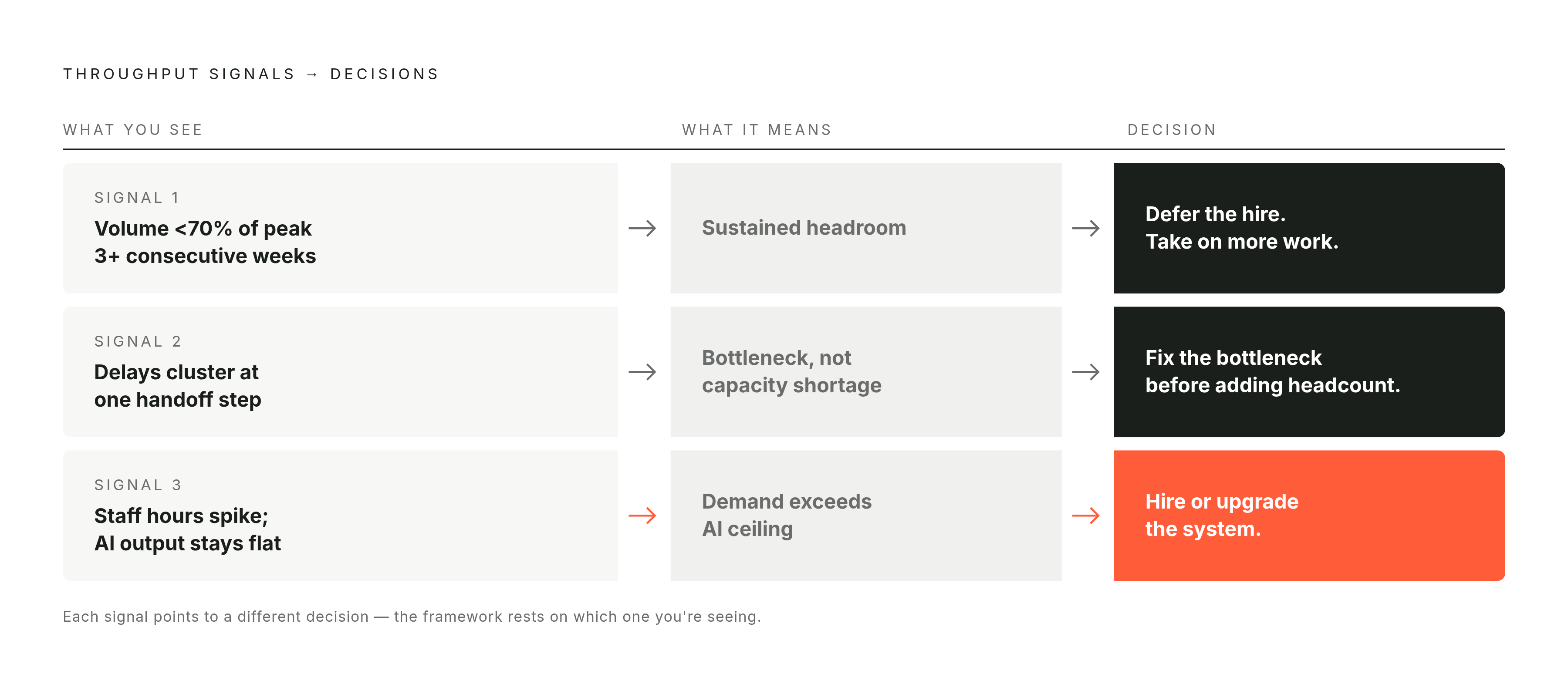
Most throughput data is background noise. Three signals separate the actionable stuff from the rest.
Sustained volume headroom. If the system consistently runs well below its observed ceiling, the workflow has slack, and slack means the team can absorb more work without hiring or sacrificing quality. Watch for average daily throughput sitting below roughly 70 to 75 percent or so of peak observed throughput for three or more consecutive weeks. That's room to take on more clients, push sales harder, or move staff toward higher-value work instead of sitting on idle capacity out of habit.
Recurring queue buildup at one specific step. When delays cluster consistently at a single stage, rather than showing up randomly across the workflow, that stage is the actual bottleneck. Look for a handoff point where items sit, errors spike, or cycle time stretches out of proportion to everywhere else. Adding a person upstream or downstream of that step wastes the resource; the constraint lives at that one point and has to be solved there before scaling makes any sense.
Volume spikes that blow past the AI ceiling and land on a person. When demand exceeds what the automated part of the workflow can handle, the overflow falls on a human by default, quietly and often without anyone noticing until the hours pile up. Watch for periods where staff hours on a workflow jump while AI output stays flat; that pattern is the early warning sign of a real capacity constraint, one that eventually forces a hire, a system upgrade, or a hard limit on new business. Each of these three signals points somewhere different: take on more work, fix a bottleneck, or get ready to scale.
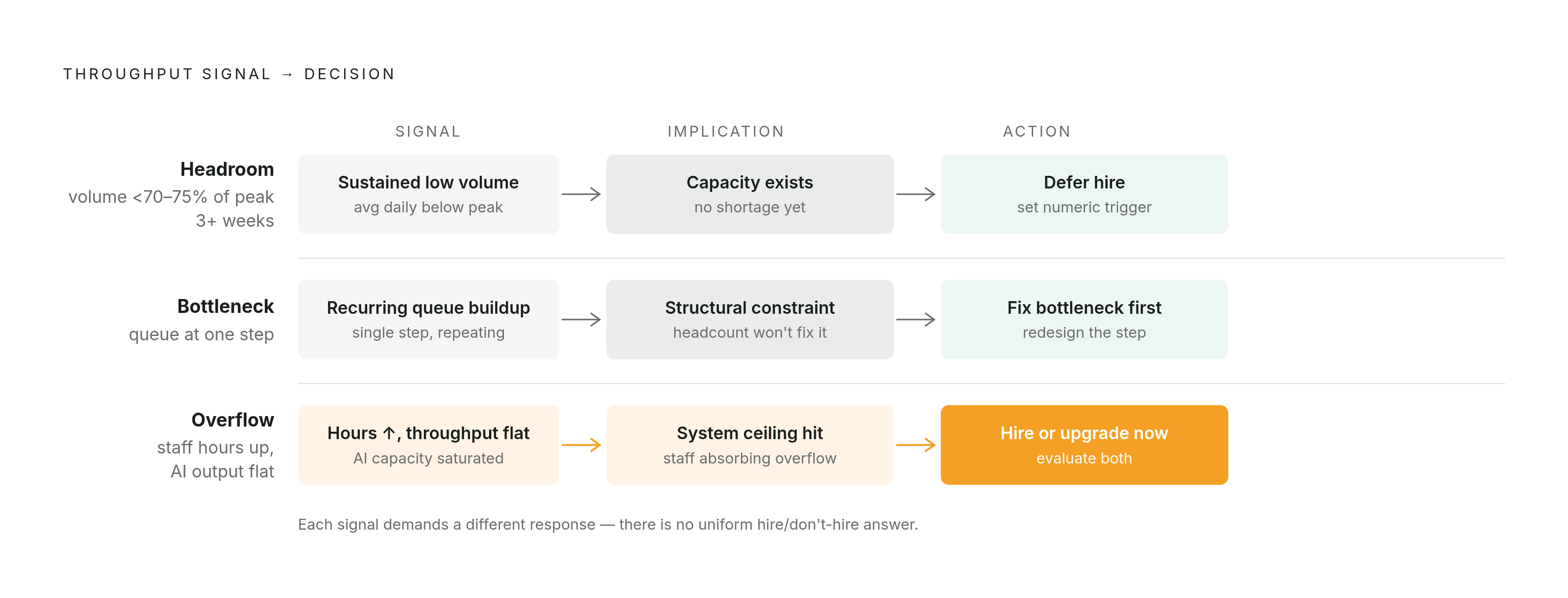
How to translate throughput signals into a staffing and growth decision
The old logic went "we're busy, so we should hire." The better logic asks where the constraint actually sits, an answer the data provides where gut instinct fails.
If the signal is headroom, defer the hire. Redirect the people you already have toward client acquisition or expanded service, and set a throughput threshold, a specific number, that triggers a hiring conversation later. If the signal is a bottleneck, spend money fixing that one step, whether that means extending the AI system to cover it, building a specialized process around it, or retraining whoever handles it, before adding headcount anywhere near it. If the signal is overflow, that's the moment to seriously evaluate a hire or a system upgrade, because the data is telling you the ceiling is structural, not a one-week fluke you'll grow out of.
The discipline that matters most: decide from the pattern rather than from the panic of the worst week of the quarter, when everyone's underwater and the instinct is to throw a body at the problem. The broader pattern across AI-adopting businesses is that AI and hiring tend to move together; AI's role is pinpointing when and why to make the call. A good throughput-informed call sounds like: "We've run at 60% of peak for six weeks straight, we can take two more accounts before we need another person." A poor one sounds like: "We're slammed, someone hire somebody."
What throughput-informed capacity planning looks like inside a real workflow
Picture a five-person freight brokerage running AI in its load-matching and quoting process. before the system went in, capacity decisions ran entirely on feel: the team turned away spot loads during busy weeks because it seemed maxed out, with everyone guessing whether the real constraint was people, process, or just raw volume.
Once the AI was embedded, it logged every load request, every quote turnaround, every completed booking. The picture that emerged surprised the owner: the vast majority of the delays clustered at carrier rate confirmation, a step the AI had left entirely alone, while quoting, where everyone assumed the slowdown lived, ran well. Quoting throughput sat well below its ceiling most weeks. Staff overflow showed up reliably on Friday afternoons, right when spot load volume spiked.
Three decisions came out of that picture. The brokerage shelved a hire it had been planning, because the quoting capacity was already sitting there unused. It aimed its next system build squarely at carrier confirmation, the actual bottleneck. And it set a Friday volume threshold that triggers a pre-arranged overflow plan instead of a scramble. That's the payoff of embedded AI beyond the obvious time savings: an operational picture sharp enough to change how the business actually plans its week.
Why throughput data is most useful when AI is embedded in the workflow, not layered on top of it
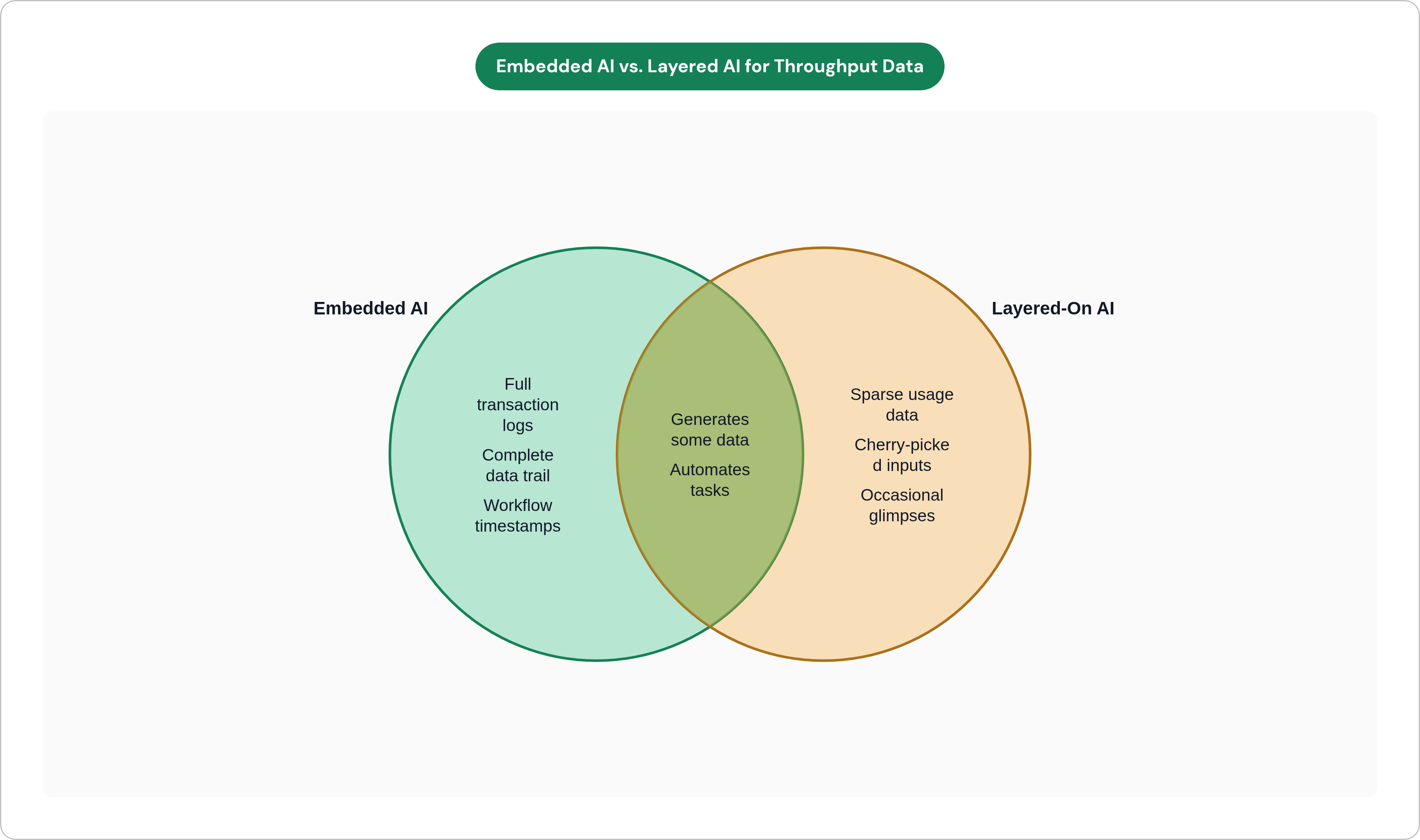
A chatbot nobody routes tickets to. A summarizer three people use occasionally when they remember it exists. These generate throughput data too, technically, but the data is sparse and unrepresentative, a sample so thin it offers almost no signal about real operational load.
Throughput data only becomes plannable when it covers most or all of the transactions in a workflow rather than a curated slice of them. Embedded AI runs on every invoice, every quote, every intake, by default, which means the data reflects what the business actually does rather than what a handful of enthusiastic early adopters happened to try. This is also, not coincidentally, what separates the businesses getting real return from AI from the ones getting a rounding error: integration depth. Systems embedded inside the actual workflow outperform standalone tools sitting off to the side, because depth of integration generates a data trail worth reading.
What embedded access buys you specifically: timestamps on every transaction rather than a sample, visibility into the handoff between AI steps and human steps so you can see exactly where automation stops and people take over, and volume data that reflects genuine demand instead of cherry-picked inputs. Customer service automation alone can achieve a 30 to 50% reduction in support handling time, but gains like that become visible and plannable only when the system generates the complete trail, not occasional glimpses of it.
Getting started: the practical sequence for building throughput-based capacity planning
Start with one workflow, ideally the one already running on AI or the strongest candidate for it: whichever handles the highest volume of a repeatable task. Instrumenting the whole business at once kills these projects.
Define three numbers for that workflow before touching anything else: volume per day, cycle time per unit, human hours consumed. Write down the current state. Confirm the AI system runs on all transactions in that workflow, all transactions, because a subset gives you noise dressed up as data. After two to four weeks, read the results against the three signals: headroom, bottleneck, overflow. Map whatever you find to the decision framework above.
Then make exactly one capacity decision from what the data shows, take on more work, fix the specific bottleneck, or set a hiring trigger, and write down the threshold that would flip that decision. Revisit the numbers monthly; throughput patterns need time to settle before they mean anything, and checking too often reintroduces the panic-driven decision-making this whole exercise is meant to replace.
The effect compounds. Once one workflow produces plannable throughput data, the same discipline applies to the next one, and the picture gets sharper each time a new piece gets added. For businesses with no AI system running yet, the sequence stays the same; only the starting point shifts: find the workflow where the missing baseline is causing the most expensive guessing, and start there. That's usually the workflow that feels the least dramatic day to day, the one where everyone struggles to say, with a straight face, what "normal" even looks like.