How to Create a Purchase Order Process Without Enterprise Software
Manual purchase orders cost $527 and take a week; here's how to automate them cheaply.
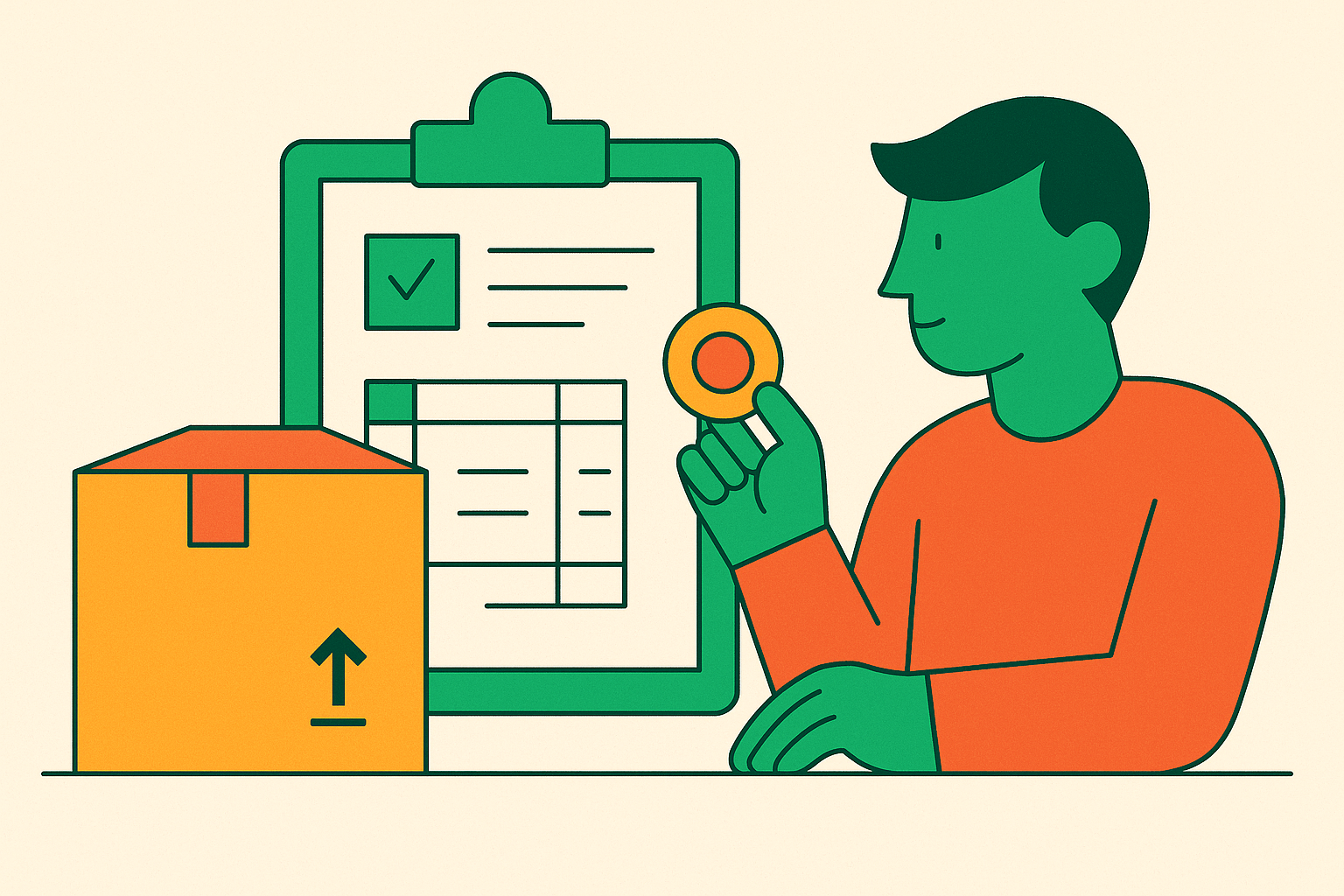
Most small businesses don't have a purchase order process. They have a spreadsheet, a group text, and a filing cabinet full of paper somebody photocopies "just in case." Manual PO handling runs about $527 an order and takes five to seven days to close; automate the same order and the price drops to $105 with a turnaround of two to four hours. Manual handling also carries an error rate of 15 to 25%, and those errors don't stay small. Up to a quarter of manually processed invoices contain mistakes, and roughly 30% of PO discrepancies trace straight back to somebody typing the wrong number into the wrong field.
Ask finance and procurement people what slows them down most and 62% say the same thing: getting a purchase order approved takes too long, and the delay originates entirely in the approval process itself. As recently as 2023, 63% of organizations were still running their POs through manual systems by default. Slow cycle times, spend that slips through without anyone signing off, and staff hours burned chasing approvals instead of doing anything that makes the business money combined to form a mess. It accumulated, the way junk drawers do — you never decide to fill one with dead batteries and orphaned cables, it just happens.
This raises an obvious question: why hasn't this been fixed already? The standard fix, enterprise procurement software, was built for a company that doesn't exist at the SMB level.
Why enterprise procurement software doesn't solve the SMB version of this problem
SAP Ariba, Coupa, and Oracle's procurement suites are built for organizations that already have IT staff and a procurement department to run them. That's a design choice, and it's exactly why these tools suit a 20-person company poorly. Full source-to-pay rollouts at large companies can take 18 to 24 months or longer. Even a mid-market Coupa implementation typically runs 4 to 12 weeks before anyone processes a real order in it.
SAP Ariba is a genuinely deep system, and that depth is the problem for a small buyer. Reviews consistently flag a steep learning curve, and the platform performs best for companies already standardized on SAP elsewhere in their stack. Pricing compounds the mismatch: these platforms quote enterprise contracts, so a business learns what it'll pay only after it's already deep in a sales process. For a company running purchasing out of a shared inbox, that kind of cost uncertainty ends the conversation before the first demo finishes. It's a bit like asking the price of a used car and being told, "depends how the test drive goes."
The pressure to fix this keeps building anyway. The Hackett Group's 2026 Procurement Agenda projects procurement workloads rising 8.0% while headcount falls 0.9% and budgets shrink 0.4%, a combined productivity gap of 8.9% that demands more than process tweaking alone. That gap requires structural change, not organizational effort alone. Lighter, SMB-oriented procurement tools do exist, with two-to-four-week setup windows and usage-based pricing instead of enterprise contracts, but even those require configuration, integration with email and accounting, and ongoing maintenance. An SMB needs a process built on tools it already owns, with AI doing the coordination work a dedicated employee used to do.
The components of a functional PO process and what each one needs to do
Strip away the governance layers enterprise software piles on top, and a purchase order process comes down to five jobs done in order: someone submits a request, the right person approves it, a document gets generated and sent to the vendor, the team tracks where that order stands, and before payment goes out, the PO, the delivery, and the invoice get checked against each other.
In a manual shop, all five of these get handled by whoever's free at the moment, which is exactly why errors pile up and approvals sit untouched in someone's inbox for days. Simple, no-code tools cover intake, storage, document generation, and status visibility without much trouble. Catching the mismatch, routing the exception, and spotting that a vendor's invoice looks unlike their last three all require an additional layer. Filling that coordination gap, the one that used to require a person watching everything at once, is where AI actually earns its spot in this story.
Building the intake and approval layer with tools an SMB already has
Requests show up by text, email, Slack message, or someone stopping by a desk to ask. The absence of a standard format and a record eliminates accountability. The fix is a form: Google Forms, Typeform, or a basic Airtable form that captures vendor, item, quantity, estimated cost, and urgency in one place. Answers land directly in a shared spreadsheet or Airtable base, visible to whoever runs purchasing, compiled automatically.
Approval routing works without a dedicated workflow platform. Set a threshold, say anything under a set dollar threshold auto-approves and anything above goes to the owner, and encode that as simple logic in Zapier or Make. Adding an AI step lets the system read the incoming request and decide which path it belongs on, flagging anything ambiguous for a person to look at before it moves forward. This replaces the inbox search, the "did you approve this?" Slack message, and the request that sat unread for three days because it landed at the bottom of someone's morning. The form and the routing logic can go live in about a week, entirely through no-code setup. Zapier and Make both start at modest monthly rates. The real cost here isn't the license; it's the hour or two it takes to set the logic up right.
Generating and sending purchase orders without manual document creation
The manual version of this step involves someone copying intake data into a Word template, checking it twice, attaching it to an email, and hoping nothing got mistyped along the way. The automated version generates a formatted PO the moment a request clears approval, pulling vendor name, items, quantities, pricing, delivery terms, and PO number straight from the intake form. Google Docs templates connected through Zapier, a Notion database-to-document automation, or Airtable's built-in document generation handle this through no-code configuration alone.
AI's job here is checking the output before it goes out the door: comparing the generated PO against a vendor master list to catch a misspelled name or an address that doesn't match the record, flagging pricing that's out of line with what the same vendor charged last time, drafting the outbound email with the PO attached so a human just glances at it and hits send. The vendor master list doesn't need to be fancy; a Google Sheet with vendor name, contact, payment terms, and typical categories does the job. The target is zero manual re-keying between the moment something gets approved and the moment the vendor has the PO in hand, because that re-keying step is where most manual errors actually happen.
Tracking open POs and knowing their status without a dedicated system
Once a PO goes out, it usually disappears into an email thread, leaving the team uncertain whether the vendor received it, when it's shipping, or whether half the order arrived and the rest is backordered. A basic tracker fixes this: every PO logged in Airtable, Notion, or a Google Sheet, with a status field that moves from Sent to Acknowledged to In Transit to Received to Closed. A Zapier workflow can watch for vendor reply emails and update the row automatically.
This is where AI earns its keep, because vendors don't write structured replies. Someone hits reply on a PO email and writes "shipping Monday, sending the rest of the order next week," and an AI step reads that sentence and updates the record automatically. The same layer can flag a PO that's gone quiet past its expected delivery window and push a Slack alert to whoever owns it, so the system catches slipping orders automatically, replacing the Friday-afternoon manual check. That weekly scramble disappears once the system is watching for it, and honestly, good riddance.
Reconciling POs, delivery receipts, and invoices before payment goes out
The three-way match, PO against delivery against invoice, is where manual processes get expensive. The PO says one quantity, the receipt says another, the invoice says a third, and somebody has to catch the gap before payment clears. Without a system doing this consistently, the check happens sporadically or not at all, which is a big part of why up to 25% of manually processed invoices contain errors in the first place.
The lightweight version runs on a consistent habit using tools already in place. The receiving team logs quantity and condition against the open PO the moment a delivery arrives, and the invoice, once it lands, routes into the same tracker through email forwarding or a simple inbox monitor. An AI step reads the invoice, pulls out vendor, amount, line items, and the PO reference number, and checks all of it against the PO and the receipt. A match sends it to payment approval with a short summary attached. A mismatch gets flagged with the actual gap spelled out, "invoice shows 12 units, PO approved 10," rather than a vague flag. That's the same check a sharp accounts payable clerk already runs, applied to every single invoice, covering the ones that previously fell through due to time constraints. The Ardent Partners benchmark found best-in-class AP teams close an invoice in 3.1 days at $2.88 each, while the average team takes 17.4 days at $12.88. That gap compounds fast across a year of invoices.
What AI actually does in this process versus what a human still needs to own
AI's lane here is narrow: pulling structured data out of messy inputs, applying routing rules, cross-checking records against each other, flagging exceptions, drafting the communications a person then reviews. Final approval on anything above threshold stays a human call, a decision about money that data-matching alone can't settle. Vendor relationships and negotiation stay human too, since AI can hand someone the numbers, but humans still sit across the table and manage the relationship.
When AI flags a mismatch, a person decides what happens next, and reviewing what gets flagged over time, a vendor who consistently shorts an order, a spend category quietly creeping up, is how the process actually improves over time.
Skip AI in the steps where it adds friction without cutting risk. AI adds friction without cutting risk when applied to trivial purchases a manager can approve at a glance. Put the automation where the volume and the error rate run highest (intake parsing, PO generation, status updates, invoice matching) and leave the judgment calls with people. Staff trust a system faster when it's obviously handling the boring, repetitive parts and surfacing the exceptions.
How long this actually takes to build and what it costs to run
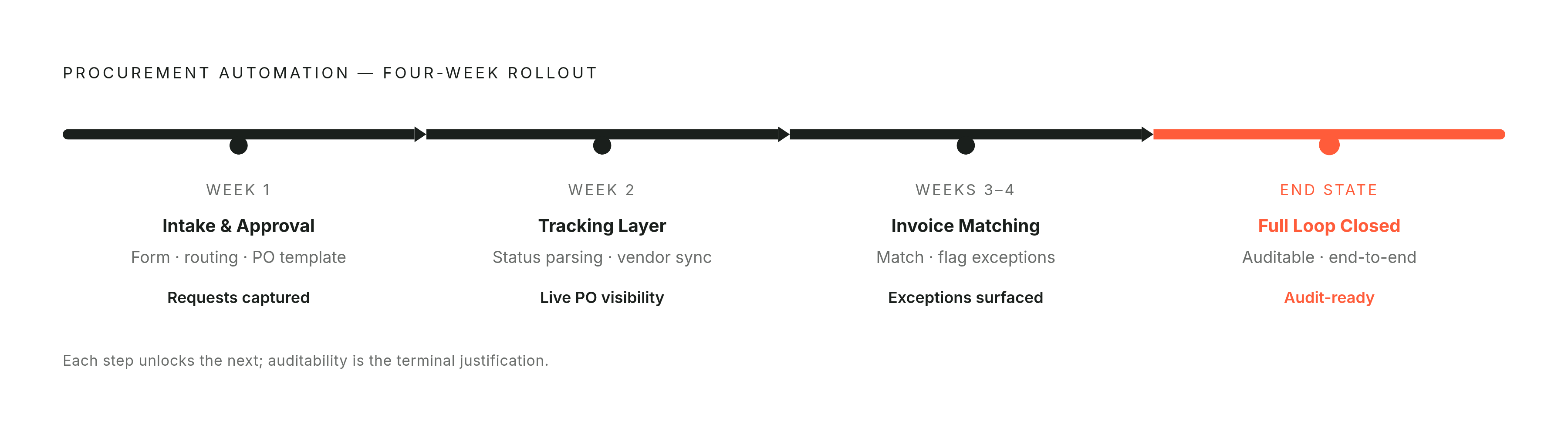
None of this needs a big-bang rollout. Week one covers the intake form, approval routing, and PO template generation, which gives the process a structured front door. Week two adds the tracking layer and vendor status parsing, so open orders stay visible automatically. Weeks three and four bring in invoice matching and exception flagging, closing the loop with something that's actually auditable.
Tooling costs stay modest at this scale. Workflow platforms run anywhere from a few dollars to a few hundred dollars a month depending on volume, and AI processing for a setup like this adds a modest incremental cost on top of that. Set that against a manual cost of $527 per order, and even a small business processing 20 POs a month burns far more in errors and lost time than it would ever spend on the tooling.
The real decision is who builds it. Someone comfortable with no-code tools can put together the intake and approval layer without much trouble. The AI parsing and matching layer takes more than a generalist, someone who knows how to set up and test an AI workflow, though it remains within reach of someone with no-code workflow skills. Hiring a full-time operations person to manage the manual version of this process instead carries a substantial annual cost in salary and overhead, while the process stays manual throughout. Weigh that against a few weeks of setup and a low-hundreds monthly tooling bill, and the answer becomes clear pretty quickly.