Document Processing Automation for Service Businesses
AI handles the messy documents service businesses struggle with today.

Rules-based automation worked beautifully on structured, predictable formats. Same vendor, same invoice template, every time: a rules-based extractor handled it without complaint. Service businesses, unfortunately, deal with the messy majority. Scanned PDFs with inconsistent layouts. Emailed attachments with handwritten fields. Multi-page contracts where clause positions vary by client and by counsel. Earlier systems failed on edge cases, which is a problem because in service work, edge cases aren't the exception; they're the operating condition. The practical upshot: you'd build an automation, feel good about it for about two weeks, and then watch it fall apart the moment a new vendor sent documents in a slightly different format.
What changed is intelligent document processing, or IDP, which uses AI to convert virtually any document into structured, usable data with minimal human intervention. The distinction that matters is generalization. Modern IDP systems handle documents they've never seen before, including formats well outside their training set. That's a different category of thing entirely — a meaningful improvement on the old approach in kind as well as in degree.
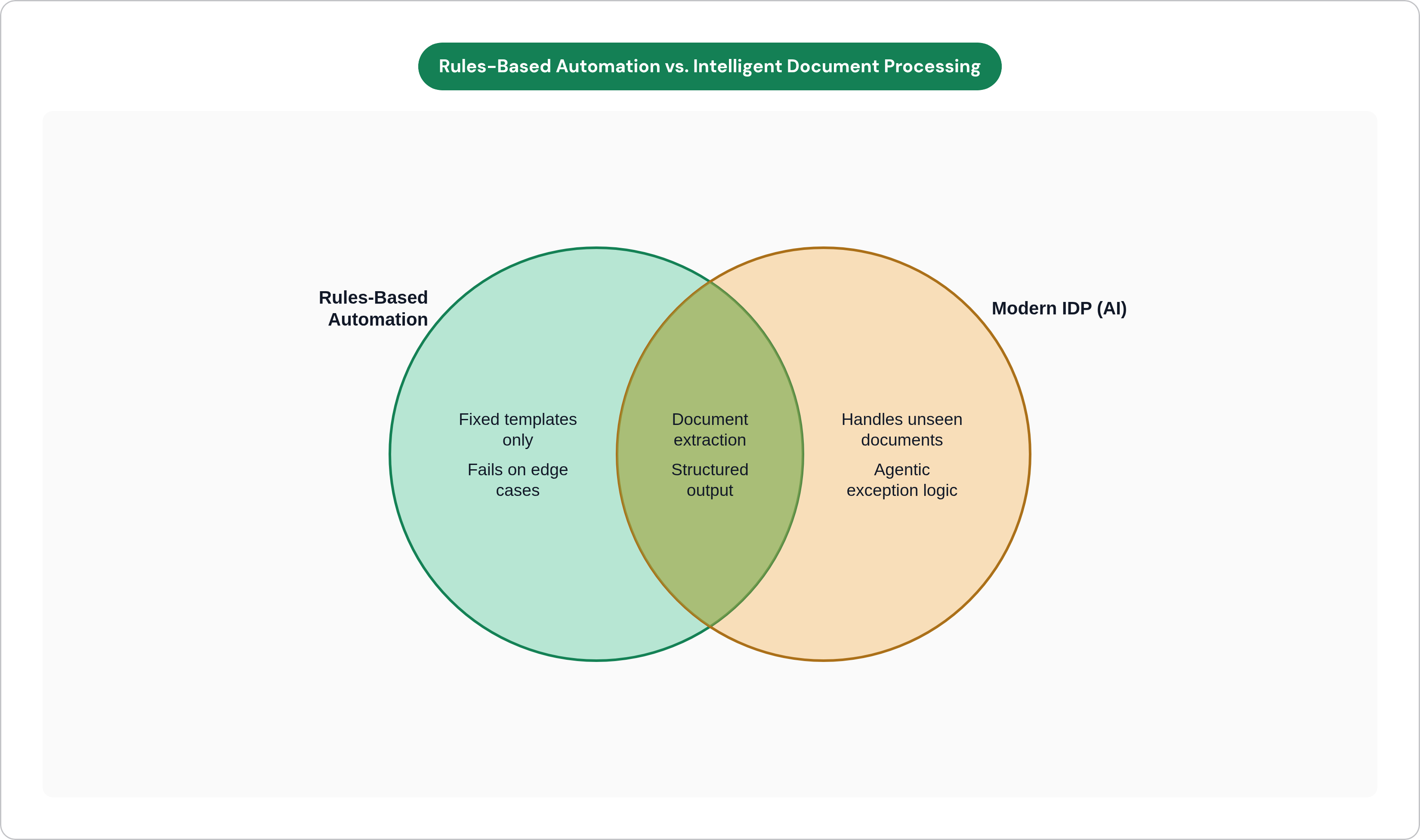
From "Extract This Field" to "Understand This Document and Act on It"
The defining shift in the current generation of tools is agentic document processing. Earlier AI could read a field and return a value. Agentic systems read context, cross-reference related documents, flag anomalies, and route decisions. Here's what that looks like in practice: an accounts payable team that once manually reviewed 40 percent of its invoices can, with a mature IDP deployment, be reviewing closer to 4 percent. That reduction comes from the AI now handling the exception logic that previously required a human in the loop, which is precisely the work that made full automation impractical in the first place.
On accuracy: manual data entry carries an error rate that vendor research consistently pegs somewhere between one and five percent, depending on document complexity. Modern IDP deployments in high-volume environments are reaching extraction accuracy in the high nineties, according to research cited by Parseur. At that level, human review becomes exception-handling rather than full-volume checking. The old model required someone to touch every document; the new model requires someone to touch the ones the system is uncertain about. The second job takes a fraction of the time.
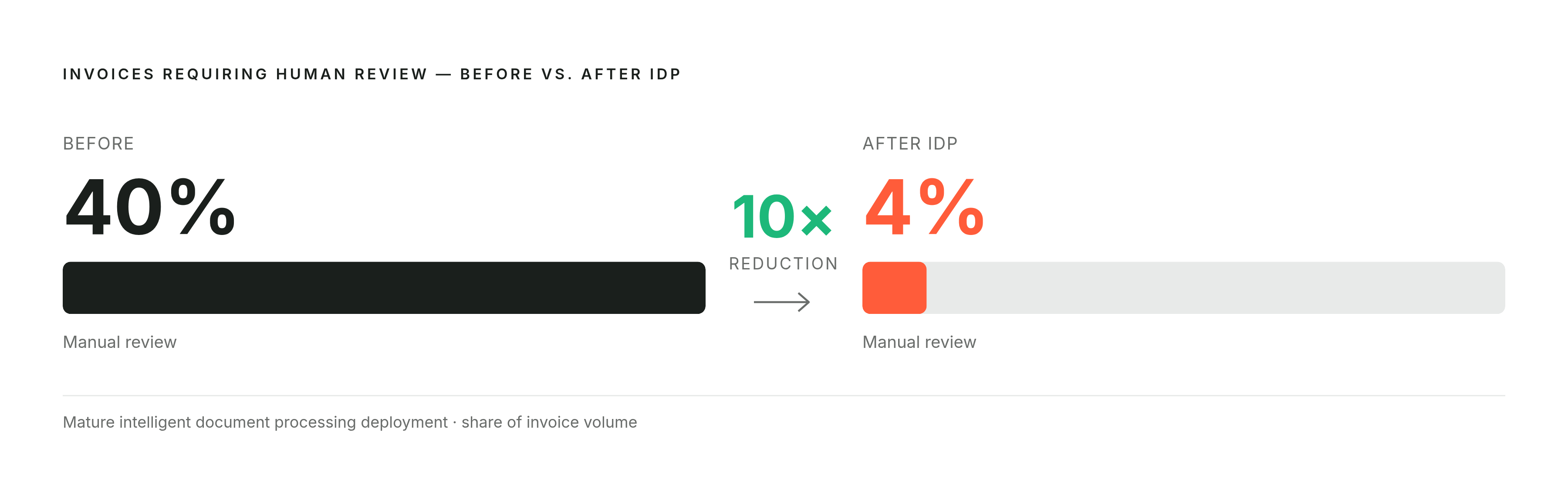
What the Bottleneck Looks Like in Accounting, Insurance, Logistics, and General Services
The specific texture of the problem differs by industry. The underlying structure does not.
Accounting Firms
The bottleneck is intake: client packets, bank statement parsing, receipt matching, year-end document collection. In busy season, the document queue grows faster than any fixed headcount can clear it. Response times slow. Review quality drops. Partner time, which should be allocated to advisory work and client relationships, gets consumed by data wrangling. The limiting factor is the ingestion rate on the front end, and talent alone cannot overcome a structural throughput problem.
Insurance Brokers and Agencies
Every application sitting in a queue is a quote that hasn't gone out, and a prospect who has already called the next broker on the list. The bottleneck here is the manual extraction and re-entry of applications, loss runs, endorsement requests, and certificates of insurance into the agency management system. One insurance broker, after automating this intake step, reduced manual data entry by 80 percent, and the quoting lag compressed accordingly. The document queue is a revenue timing problem, and misframing it as administrative is how it stays unfixed.
Logistics and Freight Companies
Bills of lading, proof of delivery, accessorial documentation, carrier invoices: these arrive in inconsistent formats from a variable roster of partners. Matching them manually across shipments creates billing delays, disputes, and missed revenue. In one documented case, automating the document workflow reclaimed more than 160 hours per month. That's not marginal. At 40 hours a week, you're talking about roughly a full-time equivalent of recovered capacity, without the recruiting process or the 90-day ramp.
General Services Firms
Consulting, staffing, legal, facilities: the document volume per engagement is lower than in logistics, but the stakes per error are higher. Contracts, statements of work, onboarding packets, vendor agreements. The hidden cost here is staff time spent locating, routing, and tracking document status rather than executing on the engagement itself. This overhead is invisible on the P&L until you try to scale and discover that throughput is capped by coordination work nobody officially owns. By then, you've usually already made the hire you didn't need.
The common thread: the document step is the gate between demand and delivery, and right now it's rate-limiting both.
How Automating One Document Workflow Unlocks Downstream Capacity
There's an important distinction between saving time and removing a ceiling. Saving each employee 26 minutes per day, which research on AI document summarization indicates is achievable, is real: it makes people slightly less exhausted without expanding what the business can take on. Removing the gate between demand and delivery is a categorically different outcome.
The mechanics play out in a sequence that's consistent enough to predict. The document step that was gating the workflow gets automated. Applications are processed, invoices are matched, intake is completed without manual re-entry. The staff time absorbed by that step becomes available for judgment-intensive tasks that move the business forward. The team can absorb more volume without adding headcount. At sufficient scale, the business can pursue a client segment or service line it previously couldn't staff.
What Changes About the Hire-Versus-Automate Decision
Before automation, adding volume means adding headcount proportionally to process documents. Linear scaling model, known ceiling: labor costs, management bandwidth, and onboarding friction compound together. After automation, volume scales without headcount scaling proportionally. The next hire is for judgment, rather than throughput. That's a different hire, a better one, and it has a higher ceiling.
The practical rule that emerges from watching this play out across service businesses: automate what is repetitive, measurable, and rules-bound; hire for trust, creativity, and complex judgment. These are sequential propositions.
One honest caveat: the capacity unlock only materializes if the freed time is redirected deliberately. Liberating hours across a team that has no additional client demand requires deliberate follow-through. The automation creates the room; the business still has to fill it. This is obvious in retrospect and frequently overlooked in the planning phase.
What Automation Actually Costs Against What Another Hire Costs
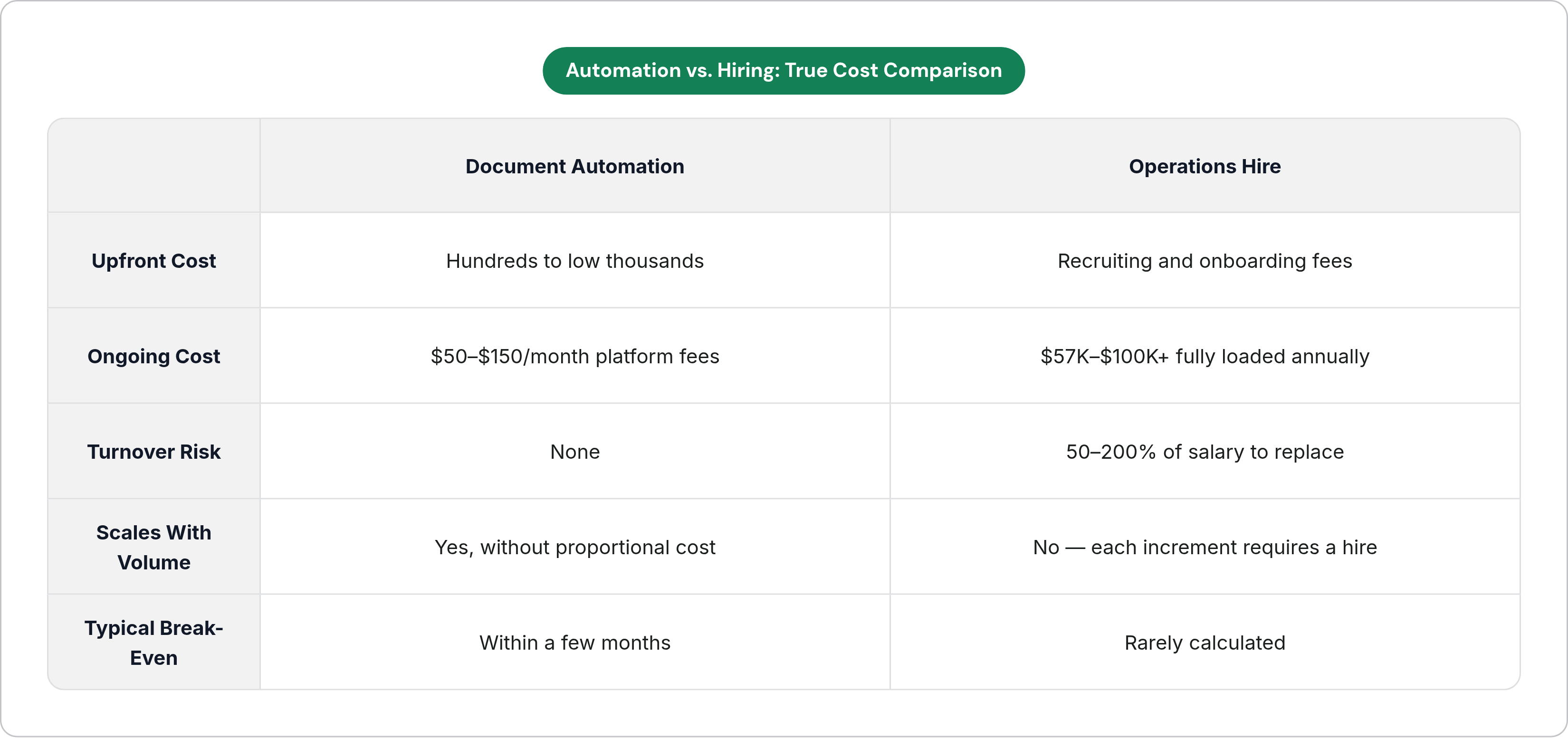
Most owners undercount the true cost of a hire. The full-cost multiplier for a U.S. employee typically runs 1.25 to 1.4 times salary once benefits, payroll taxes, equipment, and management overhead are included. A $45,000-per-year operations hire costs $57,000 to $70,000 annually in practice. A $65,000 coordinator runs $82,000 to $100,000. Then factor in turnover: replacing a departing employee in a document-heavy role costs between 50 and 200 percent of their annual salary in recruiting, onboarding, and lost productivity. That figure is rarely calculated at the time of hire and almost never remembered when the next one comes up.
Against that, what does automation cost in 2025? Starter implementations covering several document workflows typically run a few hundred to a couple thousand dollars in setup, with ongoing platform costs in the range of $50 to $150 per month using no-code tools. Comprehensive implementations covering multiple workflows typically land well under the annual cost of a single hire. API costs for AI processing have dropped substantially over the past two years; capabilities that required significant budget in 2023 are now accessible to businesses with modest technology spend.
The Parseur 2025 survey put the cost of manual data entry at an average of $28,500 per employee annually for American companies. Automation eliminates most of that cost.
A well-implemented automation also doesn't call in sick, doesn't turn over, and requires minimal onboarding when volume spikes in Q4. Most implementations reach break-even within a few months, after which the margin advantage compounds while the headcount alternative continues to require feeding.
The real question is how to automate the repetitive throughput work so the next hire is a revenue-generating role.
How Quickly a Document Automation System Can Be in Production
The deployment reality for well-scoped document workflows in 2025 is faster than most owners expect and slower than most vendors will tell you. A proof of concept for a single document type can be running in days. A production-ready system covering a defined workflow is realistically a matter of weeks. What drives the variation is how many document types are in scope, how much variability exists in incoming formats, and, critically, how clearly the downstream workflow is defined before the build begins. That last condition is the one people most want to skip, and skipping it is why implementations stall.
The diagnostic phase is what compresses timelines. Identifying the single highest-leverage document bottleneck, the one workflow that gates the most downstream capacity, is what makes rapid deployment possible. Starting there means the first deployment has the clearest ROI, the most direct path to production, and a measurement of success that isn't contested after the fact.
What a Phased Structure Looks Like
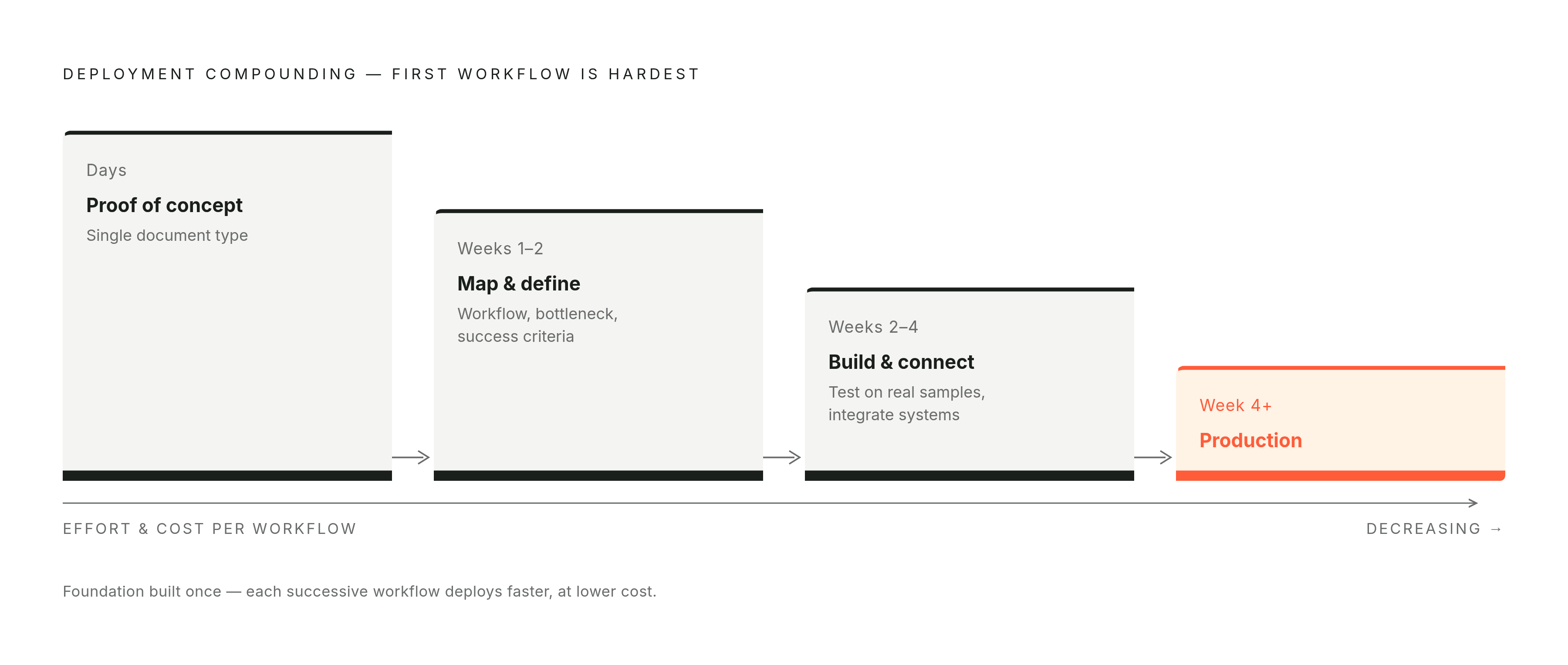
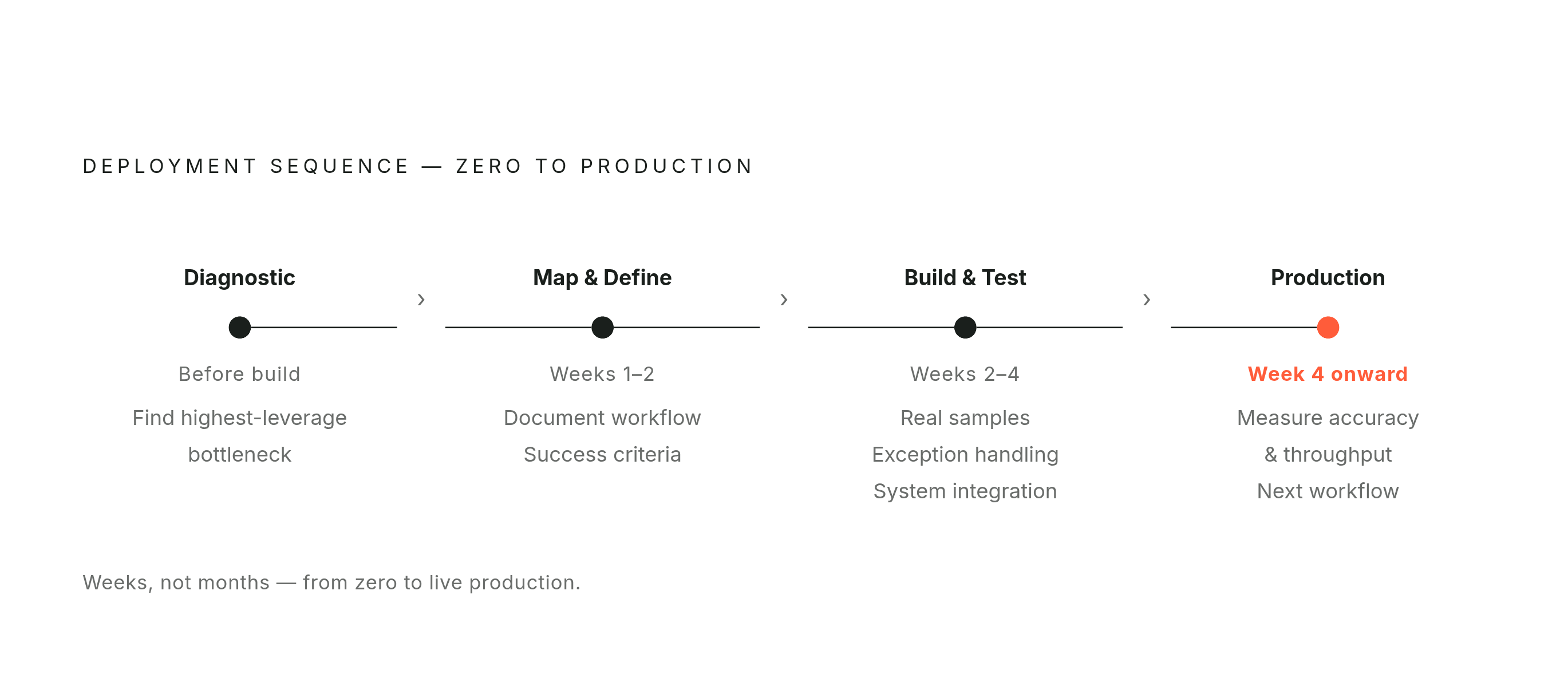
In practice: weeks one and two are spent mapping the document workflow, identifying the specific bottleneck, and defining what "extracted correctly" actually means for that document type. Precision in the success criteria determines whether the build is testing against the right thing. Weeks two through four involve building and testing against real document samples, establishing exception-handling logic, and connecting the output to existing systems. Week four onward is production, with measurement of accuracy and throughput, followed by identification of the next workflow to address.
Why the Embedded Model Matters for SMBs
The skill gap is real. McKinsey's 2025 workforce report found that nearly half of business leaders identify skill gaps as a major barrier to AI adoption. The gap is execution capability. A vendor who deploys a system and disappears is a meaningfully different proposition from an embedded or fractional AI engineer who builds the system, trains the team, and remains available when the scope expands. For businesses below the revenue threshold where a full-time AI hire makes financial sense, the embedded and fractional model is what makes enterprise-grade document automation accessible. It is the appropriate architecture for the scale.
The compounding benefit of this approach is structural. The first document workflow that goes live creates the foundation: the infrastructure, the logic, the integrations, and the team's familiarity with how the system behaves. The second and third workflows deploy faster and deliver higher leverage because the hardest architectural decisions are already made. Each successive workflow is cheaper to build and quicker to deliver value. The ceiling rises every time another bottleneck is cleared.